About this episode
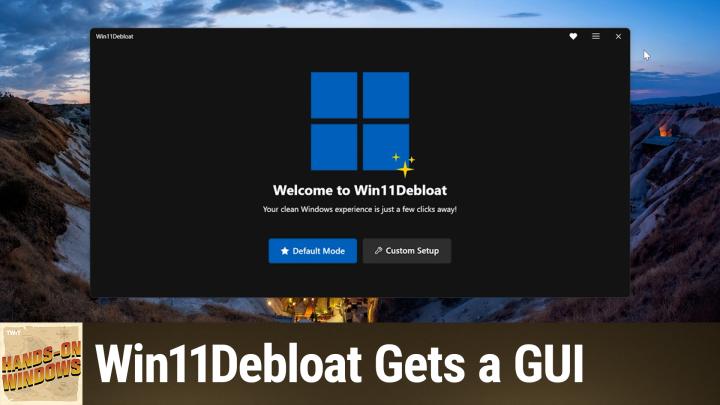
Win11 Debloat just got a major upgrade with a slick new GUI, making it easier than ever to clean up your Windows 11 without wrestling with command line scripts.
Host: Paul Thurrott
Download or subscribe to Hands-On Windows at https://twit.tv/shows/hands-on-windows
Join Club TWiT for Ad-Free Podcasts!
Support what you love and get ad-free audio and video feeds, a members-only Discord, and exclusive content. Join today: https://twit.tv/clubtwit
Club TWiT members can discuss this episode and leave feedback in the Club TWiT Discord.
Sponsor:
Get every episode summarized
Each time All TWiT.tv Shows (Audio) publishes, we email you a written briefing from the transcript — the topics, who appeared, and any specific claims, with the ad reads skipped.
Email me new episodesFree for 3 shows. No card needed.
Hosts & guests

Transcript ready
155 searchable segments. Every word is indexed and playable.
Full transcript
All TWiT.tv Shows (Audio) — Hands-On Windows 182: Win11Debloat Gets a GUI. Machine-transcribed; use the interactive transcript above to jump the player to any line.
Coming up next on Hands on Windows, we're going to take a look at a major update to my favorite Windows 11 utility. Podcasts you love. From people you trust. This is Toit. Hello everybody and welcome back to Hands on Windows on Palthrot and this week we're going to take a look at an update to win 11 DiBloat which is one of those great utilities I've mentioned in the past for kind of de-insertifying Windows. In fact, what came out of this is I ended writing a book about de-insertifying Windows called De-insertify Windows 11 which I'm not trying to sell you on exactly but we've discussed a lot of the topics in this book on this show. We've gone through a bunch of the utilities that I mentioned in this book like Tiny 11 Builder which you can use to create a really clean install of Windows 11 if you want to start fresh or win 11 DiBloat which is a great way to clean and existing Windows 11 install. But since the last time we talked
about this the author of Win 11 DiBloat has issued a major update that I think will be quite appealing to people especially if you're not super happy using command line utilities and so forth. When we first talked about it it was completely text-based and it's still a power shell script behind the scenes but it's easy to run and there's a GUI now and so I'm on the Win 11 DiBloat site this is on GitHub it has a picture of the UI there but if you scroll down he has this really handy way to get this script running remotely and so what you have to do is start a terminal window but run it with admin privileges like so and I don't really have to make this any bigger because it's going to download and unpack the zip file that includes the CXC and then the XC is going to run and there it is. So unfortunately this thing does not, let me see if I can get it as big as it
can be but it won't really fill the screen it's kind of an awkward app in some ways but again much friendlier than it used to be. So there are two modes now there's the default mode which I do not recommend and then a custom setup which we'll look at in a minute so if you go to default mode what you're going to get here is the scripts or the apps recommend or desired configuration right so he's removing a lot of applications to sabling telemetry to sabling widgets etc you can see the list here it's a lot of stuff it's only being applied to the current user that's good except for the apps which are being applied to all users I'm not sure about that one and he has auto selected this option down here for the restore point which actually does make sense however let me back out of that I do not recommend that so I'm going to run that one more time because I think the real power here isn't just stripping everything out of windows because at that point you might find that you need some of it back but rather to just strip the stuff out
that you want to get rid of right and so we'll look at that in one moment. This episode of hands-on windows brought to you by my thinks canary there it is looks like a I don't know USB drive external USB drive and sure enough it does have a USB connector but maybe the giveaway is it's also got an ethernet connector because this is not what it looks like it's a honeypot it is designed to get hackers to hack on them and that way they'll announce themselves and really this is super important for your security how do you know if somebody has breached your perimeter defenses and is inside the network warming around ex-filterating information planting time bombs how would you know hackers are pretty wildly they cover their tracks most companies on average discover that they've been breached 91 days after the breach that's three months of bad guy has full access to everything on your network that should give you chills right well that's why you
need and that's why we use these great thinks canaries their honeypots that can impersonate anything in fact it's really easy to set up a thinks canary you can deploy it in minutes now this one is a synology NAS but it could be a windows server a sharepoint server a Linux box it could be a Christmas tree of services all it up or just a few carefully selected services to tempt the wily hacker it could even be I mean it can be almost anything escaded device the other thing it does that I love is it also lets you create files an unlimited number of files lures if you will trip wires that you can spread everywhere around your network even on your cloud I have on our google drive for instance something that looks exactly like a spreadsheet that says payroll information oh man there's no way a bad guy can resist this but when they try to open those files you will immediately get an alert and you get it the way you want it same thing if they try to access your fake ssh server in your thinks canary you can get an alert via text
message slack email it supports web hooks so you could be discord telegram whatever you want they even have an API so you can build it into your own software but the point is you won't get an alert unless somebody's doing something bad only the alerts that matter just choose a profile for your thinks canary device register it with a hosted console for monitoring and notifications then sit back and relax because an attacker who's breached your network cannot resist attacking your thinks canary or those lures files even malicious insiders just have to let themselves be known by accessing your thinks canary would happen to us in fact the only time it ever happened we've been pretty good with our security I'm happy to say this is one of those devices you don't want to hear from because if you hear from it you know you got a problem but better to know than not know right the only time it ever happened to us one of our team had put it was for review you have a of an n a s device from a company who shall remain nameless that went out and pinged
every port in the network I immediately got an alert it said it's coming from this IP address we tracked it down and we disconnected it through the device out now that turned out not to be a big security issue but it was good to know before it became big security issue that's why you need a thinks canary a big bank might have hundreds you certainly should have one for every segment on your network small business like ours maybe just a handful find out go to canary dot tools slash twit if you just need a handful five of them 7500 bucks a year you get five things canaries your own hosted console you get upgrades you get support you get maintenance and if you use the code twit in the how did you hear about this box you get 10% off the price and not just for the first year but for as long as you own your thinks canaries 10% off that's pretty good also here's good news you could always return your thinks canary with their two months money back guarantee for a full refund so there's absolutely no risk I should tell you that next month will be the 10th year of our
partnership with thinks canary 10 years they've been advertising on our shows and that refund has not ever ever ever not once been claimed and I know why I can't live without our thinks canaries you will feel the same way visit canary that tools slash twit don't forget the offer code twit in the how did you hear about this box canary that tools slash twit we thank him so much for supporting Paul and hands on windows now back to the show okay so if you go through the custom setup for when 11 to blow it now there'll be two main screens there's this app removal screen and then a source a system tweak screen we'll look at later as before recommend only showing the installed apps are not really clear where he gets that list of apps to potentially uninstall but I think it makes a lot more sense just to see what's on the system itself as they might go through here I'm not going to do too too much here because this is actually pretty clean but I'll just select
something so something does happen you'll notice that you can remove Microsoft Edge which I'm not going to do here because I'm actually using it this time it despite what it says here you can do this anywhere you can remove this or works fine it does work fine you can also remove one drive although one drive is one of those apps that you can remove from the native UI so normally I would select a lot more apps here but you get the idea of the select the one and this is where the real magic happens so in the system tweak screen there's a lot going on of course strongly recommend going through all of this but I would pretty much just say yes to all of this stuff under privacy and suggested content right the big thing here and this is something you could do with a registry or a group policy hack is actually disabling telemetry right not making it do less which is built into the UI but actually disabling it so that's huge we're going to look at some AI stuff here in a future episode but again I strongly recommend going through this I would also look at everything
here in Windows update right you don't want necessarily want you might want but I don't want the computer to automatically restart every single time does an update right I want to be told about that I want to be given the opportunity to do it myself I don't want to lose any data obviously although Windows is pretty good about that stuff and then you could just go through this right obviously I've had recommended section to start menu you know you might want to disable Bing search I'm not even sure if I have that installed I've already removed that actually so it's not going to do anything but you can disable whatever you want to disable here so this is you know it's just pretty straightforward this is actually really nice and then you get to the screen and now it's going to tell you what it's going to do which is great it's going to tell you where it's going to apply these changes typically would want it to be the current user if you have a computer with multiple users you may not want to remove the apps for everybody you might want to just do that for the current user account your user account that's up to you of course
but when you get down to the bottom here strongly recommend creating a system restore point and also restarting Windows Explorer the process if you're making any changes to explore based on that previous screen you might not see some of them unless you reboot or restart Explorer will do that for you I'm not going to do it right now but I do normally have that option chosen so from there you apply and bam that's done now the only wrinkle here is if you choose to uninstall Windows Explorer sorry Microsoft Edge close-pull and you don't live in the EEA European Economic Area it will give you a dialogue this is the normal uninstall didn't work you want us to force uninstall it says it's not recommended but I have done that on multiple systems I've never had a problem it works it does the job we can close explore now as far as me showing you
changes from what I just did that's going to be difficult because I've already cleaned this system before but you get the idea and this is a way to you you have the system it might be a little messy you might have things installed and things going on that you didn't want or didn't anticipate or whatever and this is a really nice way to just make those you know the cleanup changes after the fact which I think is what most people are looking for obviously you don't mind starting over from scratch you might use a tool like tiny 11 builder and get that super clean version of Windows from the get go but when you do that you have to you might have to install a handful of apps right that one will get rid of edge it will get rid of one drive etc so you might find you have to go into the store and maybe install a couple of apps but I recommend using Windows when 11 to bloat and if you again if you are not a big fan of terminal or command line applications I get it but this is just a simple copy paste you have to run it as admin boom you're done it's fantastic I mean this thing just works great um so I hope you found this useful we're
going to look at some AI removal techniques in the next episode kind of building off that de-insertification theme that we started here today but when 11 to bloat is one of many utilities I do this kind of thing of course it's my favorite it's the one that works the best of my opinion I hope you like it I think you should give it a try and we will have a new episode of hands on Windows every Thursday um thank you for watching thank you especially to our club twit members you can find out more about this show at twit.tv slash HOW and you can find out more about club twit at twit.tv slash club twit thanks see you next week hey there it's Leo Laporte host of so many shows on the twit network thinking about advertising in 2026 we host a network of the most trusted shows in tech each featuring authentic post-read ads delivered by Michael Sargent my co-host and of course me our listeners don't just hear our ads they really believe in them because we've established a relationship with them they
trust us according to twit fans they've purchased several items advertised on the twit network because they trust their team's expertise in the latest technology if twit supports it they know they can trust it in fact 88% of our audience has made a purchase because of a twit at over 90% help make IT and tech buying decisions at their companies these are the people you want to talk to ask david kouver he's the senior strategist at threat lock david said twits hosts are some of the most respected voices in technology and cyber security and their audience reflects that same level of expertise and engagement it's the engagement it really makes a difference to us with every campaign you're going to get measurable results you get presents on our show episode pages in fact we even have links right there in the rss feed descriptions plus our team will support you every step of the way so if you're ready to reach the most influential audience in tech email us partner at twit.tv or head to twit.tv slash advertise i'm looking forward to telling our qualified audience about your great product
you us a knows dynamic duos can save the day like superheroes and sidetix or auto and home insurance with us a you can bundle your auto and home and save up to 10% tap the banner to learn more and get a quote at us a dot com slash bundle restriction supply
More episodes
More from All TWiT.tv Shows (Audio)

Security Now 1095: AI-Driven Expertise Loss
All TWiT.tv Shows (Audio)

MacBreak Weekly 1041: SHAME
All TWiT.tv Shows (Audio)

This Week in Tech 1100: Yoloville
All TWiT.tv Shows (Audio)

Untitled Linux Show 269: Kerfluffel
All TWiT.tv Shows (Audio)