The Classic Computer Vision Trick Behind Smooth Image Blending
About this episode
This story was originally published on HackerNoon at: https://hackernoon.com/the-classic-computer-vision-trick-behind-smooth-image-blending.
Learn how to create seamless image collages using Laplacian Pyramid Blending with this Python tutorial.
Check more stories related to programming at: https://hackernoon.com/c/programming.
You can also check exclusive content about #opencv, #computer-vision-(cv), #google-colab, #python-notebook, #laplacian-pyramid, #gaussian, #computer-photography, #laplacian-pyramid-blending, and more.
This story was written by: @farzon. Learn more about this writer by checking @farzon's about page,
and for more stories, please visit hackernoon.com.
This post explains Laplacian Pyramid Blending, a classic computer vision technique that blends images by separating fine details from broad color strokes. By using Gaussian Pyramids to blur and Laplacian Pyramids to isolate edges, you can create buttery-smooth transitions.
Get every episode summarized
Each time Programming Tech Brief By HackerNoon publishes, we email you a written briefing from the transcript — the topics, who appeared, and any specific claims, with the ad reads skipped.
Email me new episodesFree for 3 shows. No card needed.
Hosts & guests
Transcript ready
44 searchable segments. Every word is indexed and playable.
Full transcript
Programming Tech Brief By HackerNoon — The Classic Computer Vision Trick Behind Smooth Image Blending. Machine-transcribed; use the interactive transcript above to jump the player to any line.
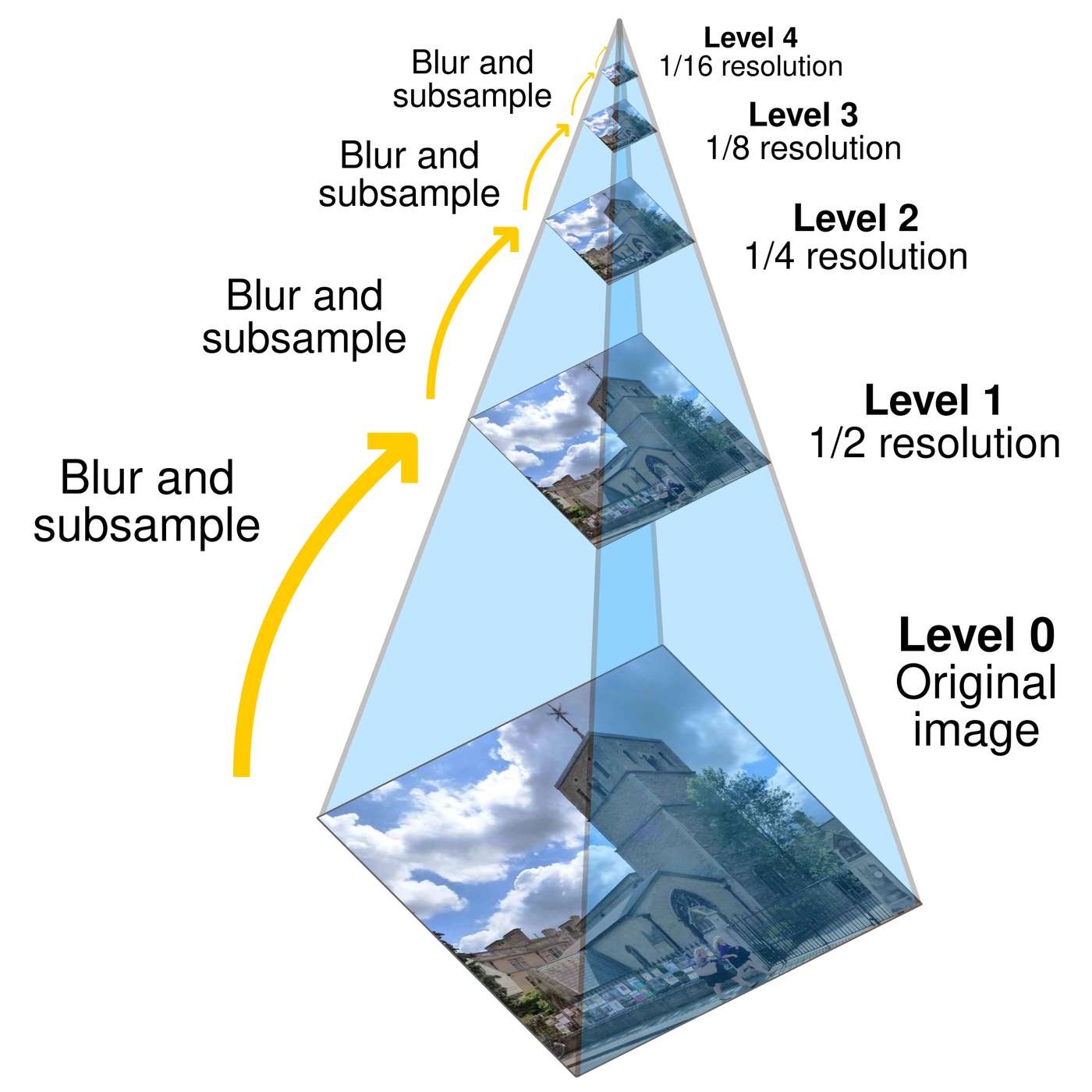
This audio is presented by Hacker Noon, where anyone can learn anything about any technology. The classic computer vision trick behind smooth image blending. By Farzone Lotfi. If you have ever tried to create a multi-panel collage by stitching many images together you have likely run into the problem of harsh, visible seams. Slightly better would be some naive alpha blending. Slightly worse are simple cut and paste jobs. Both leave unnatural transitions or ghosting artifacts. To get those buttery smooth, seamless transitions, we can use a classic computer vision technique, Laplacian Pyramid blending. Below you can see how awesome the results can be. Building the pyramids. To blend two images, let's call them image A and image B. Without harsh seams, we have to treat the broad strokes. Low frequencies, like lighting and color, differently than the fine details, high frequencies, like sharp edges. We doth this using image pyramids. The Gaussian Pyramid, reduce. We take our original image and run a Gaussian filter, blur,
over it, then downsample it, e.g. shrink in 8x8 image to a 4x4, then 2x2, then 1x1. Each step is a new, level, in our Pyramid, representing progressively coarser, lower frequency data. The Laplacian Pyramid, expand. This isolates the details. We take a smaller, coarser level of the Gaussian Pyramid and expand it to match the size of the level below it. Because expanding is basically guessing the pixels in between, it's not perfect. We subtract this expanded image from the actual image at that level to get an error image. This error image is the Laplacian. It basically looks like an edge map containing all the high frequency details. The blending process suppose you have image A, image B, and a mask, region R, that tells the computer where the blend should happen. In the process I learned the blending works from coarse to fine, 1. Build the Laplacian Pyramids for image A and image B, L underscore A and L underscore B. 2. Build a Gaussian Pyramid for your mask, G underscore R. Blurring the mask as it gets smaller
ensures that the transition zone widens for lower frequencies. 3. Form a combined Laplacian Pyramid, dollar L underscore O dollar, using the mosques Gaussian Pyramid as weights. The formula at each level looks like this. 4. 5. Finally, collapse the combined Pyramid, L underscore O, by continually expanding and adding the levels back together to get the final blended image. The code IMPL EMEN TATI ONI wrote a Python implementation that handles this exact mathematical process. It computes the Pyramids, applies the blending step at each level, and reconstructs the output. You can check out the full source code on my GitHub here. Laplacian blending with Python. Or check out the colab directly. Conclusion BY breaking images down into their frequency bands using Gaussian and Laplacian Pyramids. We can blend the structural details and the broad lighting separately. The result is a composite image that fools the human eye into seeing buttersmuth transition. Grab the code, create some image masks, and try making your own seamless
collages. Credit where it's due, computational photography course at Georgia Techie have to mention that a fantastic resource for learning these concepts is Georgia Tech's CS 6475 Computational Photography Class. I took this course when I was in grad school and it was one of my favorite courses. If you want a deep dive into the math and theory, I highly recommend checking out these excellent course notes compiled by Monser Sala. The theory above leans on the foundational concepts taught in that course. Thank you for listening to this Hackernoon story, read by artificial intelligence. Visit Hackernoon.com to read, write, learn and publish.
More episodes
More from Programming Tech Brief By HackerNoon

Build a Tiny Grep Clone While Rust Teaches You Who Owns What
Programming Tech Brief By HackerNoon

Deterministic Routing: The Hidden Key to Low Latency
Programming Tech Brief By HackerNoon

7 Essential IP Geolocation API Features Every Developer Needs
Programming Tech Brief By HackerNoon

What If the Next Killer Device Isn’t a Phone — But a Memory Upgrade?
Programming Tech Brief By HackerNoon